



- No products in the cart.
- Home
- Terrarium lighting
- Arcadia LumenIZE LED-to-LED 1.2 M Link Cable
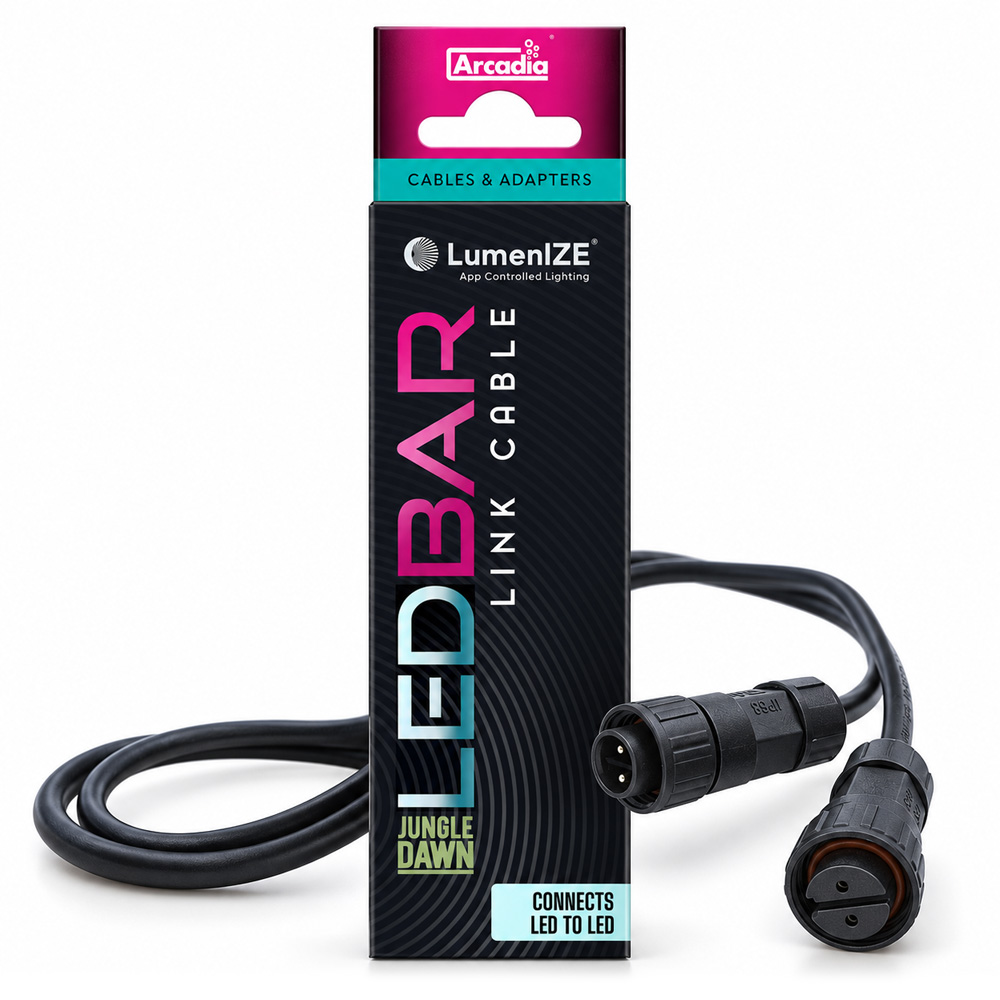
Arcadia LumenIZE LED-to-LED 1.2 M Link Cable
The Arcadia LumenIZE LED-to-LED 1.2 M Link Cable is a 120 cm water-resistant connection cable for linking two Arcadia LumenIZE JungleDawn LED Bars. This allows you to connect multiple LED fixtures to a single compatible power source without needing a separate outlet for each light. The IP65-rated cable ensures a neat installation, while each LED Bar can be controlled individually via the free LumenIZE app.
€ 14,90
- Professional Advice from Our Specialists
- Trusted by 600+ Customers (9.8 / 10)
- Pay the Way You Prefer
- 24/7 Reachable via WhatsApp
Description
Reviews
Description
Arcadia LumenIZE LED to LED 1.2 M Link Cable – easily connect two LED Bars
The Arcadia LumenIZE LED to LED 1.2 M Link Cable is specifically designed for connecting two Arcadia LumenIZE JungleDawn LED Bars. With this original Arcadia connection cable, you can connect multiple LED fixtures to a single compatible power supply.
This is particularly useful for larger terrariums, densely planted vivariums, and reptile enclosures that use multiple LED lights.
Instead of plugging each LED bar into an outlet individually, you connect the fixtures directly to one another. This keeps the wiring neat and allows you to easily expand your lighting system.
The cable is 120 centimeters long and features connectors specially designed for the Arcadia LumenIZE JungleDawn LED series.
Connecting Multiple JungleDawn LED Bars
With the Arcadia LumenIZE LED-to-LED 1.2 M Link Cable, you can connect two compatible JungleDawn LED Bars directly to each other.
Connect the first LED fixture to a suitable power source. Then use the connecting cable to connect the second LED bar.
If you want to use more fixtures, you can further expand the system with additional LumenIZE connection cables.
Arcadia supports the connection of up to ten compatible LumenIZE units, depending on the allowable electrical load and the fixtures used.
This makes the system appealing to terrarium owners who want to use multiple lights without having to deal with a large number of separate power cords and outlets.
Designed specifically for Arcadia LumenIZE JungleDawn LED Bars
The Arcadia LumenIZE LED-to-LED 1.2 M Link Cable is designed for the smart JungleDawn LED Bars from the Arcadia LumenIZE series.
These LED lights are designed to provide powerful daylight illumination for reptile terrariums, vivariums, and planted enclosures.
The JungleDawn LED Bar is used, among other things, to improve lighting conditions in a terrarium and to support the growth of suitable terrarium plants.
With the LumenIZE LED-to-LED Link Cable, you can combine different compatible models of the JungleDawn LED Bar.
This allows you to distribute multiple LED fixtures across a larger area and better tailor the lighting to the layout of the space.
The connection cable is designed exclusively for JungleDawn LED Bars with LumenIZE technology.
Conventional JungleDawn LED bars without LumenIZE connectors cannot be connected using this cable.
Ideal for larger and densely planted terrariums
In larger terrariums, a single LED fixture may be insufficient to evenly illuminate all plants and decorative elements.
Supplemental lighting may be desirable, especially in tropical terrariums with many bromeliads, ferns, climbing plants, and other plants.
With multiple Arcadia LumenIZE JungleDawn LED Bars, you can distribute the lighting across different areas of the enclosure.
The LED-to-LED Link Cable makes it easy to connect these fixtures to one another.
For example, you can place an LED bar above the central section of the terrarium and use a second light fixture to provide additional lighting for a densely planted side.
This allows for more freedom in designing a natural and well-lit terrarium setup.
Individual control via the Arcadia LumenIZE app
A key advantage of the LumenIZE system is that the connected LED bars can be controlled individually.
Although the lights are connected to a single compatible power source, they retain their own lighting programs.
Each LumenIZE JungleDawn LED Bar features internal electronics and memory that store the preset lighting programs.
Using the free Arcadia LumenIZE app, you can control each LED bar individually.
For example, you can set different turn-on times, light intensities, and daily lighting schedules.
This is useful when you want to create different zones in a terrarium.
The connecting cable provides only the electrical connection between the fixtures. Bluetooth control is handled via the LumenIZE technology of the connected LED bars.
Programmable sunrise and sunset
With the Arcadia LumenIZE JungleDawn LED Bars, you can create a natural daylight cycle.
In nature, the amount of light gradually increases throughout the morning. At the end of the day, the light intensity decreases again as night approaches.
The LumenIZE app makes it possible to mimic this natural transition.
When you connect multiple LED bars together, you can set a separate lighting program for each fixture.
For example, one LED bar might turn on before the other, or operate at a different brightness level throughout the day.
This allows you to adjust the lighting to suit different areas of the terrarium and the needs of the plants and animals inside.
Adding an additional LED bar does not automatically change the existing programs of previously connected fixtures.
Fewer Cables and Outlets
In terrariums with multiple light sources, the wiring can quickly become a tangled mess.
When each LED bar requires its own power cable, this often results in multiple cables and plug connections behind or above the enclosure.
The Arcadia LumenIZE LED-to-LED Link Cable helps prevent this.
Because multiple compatible LED bars can be connected to a single suitable power supply, fewer individual power connections are needed.
This results in a neater and more organized installation.
This is a practical advantage, especially for terrarium setups and larger vivariums.
Cable length of 120 centimeters
The Arcadia LumenIZE LED-to-LED 1.2 M Link Cable is 1.2 meters long.
This allows you to place two JungleDawn LED Bars some distance apart.
The cable is flexible enough to allow the fixtures to be mounted side by side or distributed across different sections of a larger terrarium.
The 120-centimeter length can also be useful when placing multiple terrariums side by side.
Ideally, route the cable along a solid surface and avoid pulling it too tight.
Make sure the connections are not strained by the weight of the cable or by movement of parts of the terrarium setup.
IP65 Water-Resistant Version
The Arcadia LumenIZE LED-to-LED 1.2 M Link Cable has an IP65 rating.
This classification indicates that the properly connected joint is protected against dust and water jets under the corresponding test conditions.
This makes the cable suitable for various terrarium setups, including humid tropical enclosures.
This is particularly interesting for terrariums that are regularly misted or that have high humidity.
The IP65 rating does not mean that the cable is suitable for use underwater.
Make sure all connectors are properly connected, and avoid leaving electrical connections submerged in water for extended periods of time.
Suitable for terrarium setups and breeding systems
The Arcadia LumenIZE LED-to-LED Link Cable isn’t just useful for a single large terrarium.
Connecting multiple LED fixtures can also offer practical benefits for reptile enclosures and breeding setups.
If multiple rooms are equipped with LumenIZE JungleDawn LED Bars, you can connect the lighting to a single power source using appropriate connecting cables.
Each LED bar retains its own settings.
This allows you to use different lighting programs for individual terrariums without needing a separate power connection for each lamp.
Always check that the total load remains within the permitted limits of the LumenIZE fixtures being used.
Difference between T5 to T5, T5 to LED, and LED to LED
Arcadia has developed three different connection cables for the LumenIZE system.
Each model features connectors designed to fit specific LumenIZE fixtures.
| Connection Cable | Application | Manufacturer code |
|---|---|---|
| T5 to T5 | Connecting Two LumenIZE Pro T5 UVB Kits | RARLLC1 |
| T5 to LED | Connecting the LumenIZE Pro T5 to the JungleDawn LED Bar | RARLLC2 |
| LED to LED | Connecting Two LumenIZE JungleDawn LED Bars | RARLLC3 |
The LED-to-LED Link Cable is therefore intended exclusively for connecting two compatible JungleDawn LED bars.
Would you like to connect a LumenIZE Pro T5 UVB Kit to a JungleDawn LED Bar? If so, choose the separately available T5 to LED Link Cable.
To connect two LumenIZE Pro T5 UVB fixtures, use the T5 to T5 Link Cable.
Technical specifications
| Specification | |
|---|---|
| Brand | Arcadia Reptile |
| Product Line | LumenIZE |
| Product Name | LED to LED 1.2 M Link Cable |
| Product Type | Connection Cable for LED Terrarium Lighting |
| Connection Type | LED to LED |
| Cable length | 120 cm |
| Black | |
| IP Rating | IP65 |
| Suitable for | Arcadia LumenIZE JungleDawn LED Bars |
| Maximum number of linked units | Up to 10, within system limits |
| Individual app control | Via connected LumenIZE fixtures |
| Custom Lighting Programs | Yes |
| Net Weight | Approximately 62 grams |
| Manufacturer Code | RARLLC3 |
| EAN | 5018296000777 |
| Compatible with standard JungleDawn without LumenIZE | No |
| Power adapter included | No |
Package Contents
The package contains one Arcadia LumenIZE LED-to-LED 1.2 M Link Cable, which is 1.2 meters long.
JungleDawn LED Bars and the main power cable are sold separately.
Instructions for use
Switch off the power supply completely before connecting the connection cable.
Check to make sure that both LED fixtures are part of the Arcadia LumenIZE JungleDawn LED series.
Connect the LED-to-LED link cable to the appropriate connectors on both fixtures.
Check to make sure the connectors are properly and securely attached.
Route the cable neatly along the terrarium and avoid sharp kinks, tension, and damage to the connections.
If you want to connect multiple LED bars, check in advance to make sure the total electrical load remains within the system’s permissible limits.
Once connected, you can configure the individual LED bars using the free Arcadia LumenIZE app.
Use the cable only with compatible LumenIZE lighting systems and not with conventional JungleDawn LED bars or lighting from other brands.
Reviews
Add a review
You must be logged in to post a review Log In
Maybe something for you as well?


€ 19,90

€ 26,90

€ 6,90

€ 16,90


From € 169,90
Select Options
This product has multiple variants. The options may be chosen on the product page
From € 71,90
Select Options
This product has multiple variants. The options may be chosen on the product page
€ 23,90
Select Options
This product has multiple variants. The options may be chosen on the product page
Item added to wishlist
View Wishlist
Item removed from wishlist
More Products that you might like?
€ 19,90
€ 26,90
€ 6,90
€ 16,90
From € 169,90
Select Options
This product has multiple variants. The options may be chosen on the product page
From € 71,90
Select Options
This product has multiple variants. The options may be chosen on the product page
€ 23,90
Select Options
This product has multiple variants. The options may be chosen on the product page
Item added to wishlist
View Wishlist
Item removed from wishlist
 Biotopo

Reviews
There are no reviews yet